
Find One SQS Message
in Ten Thousand.
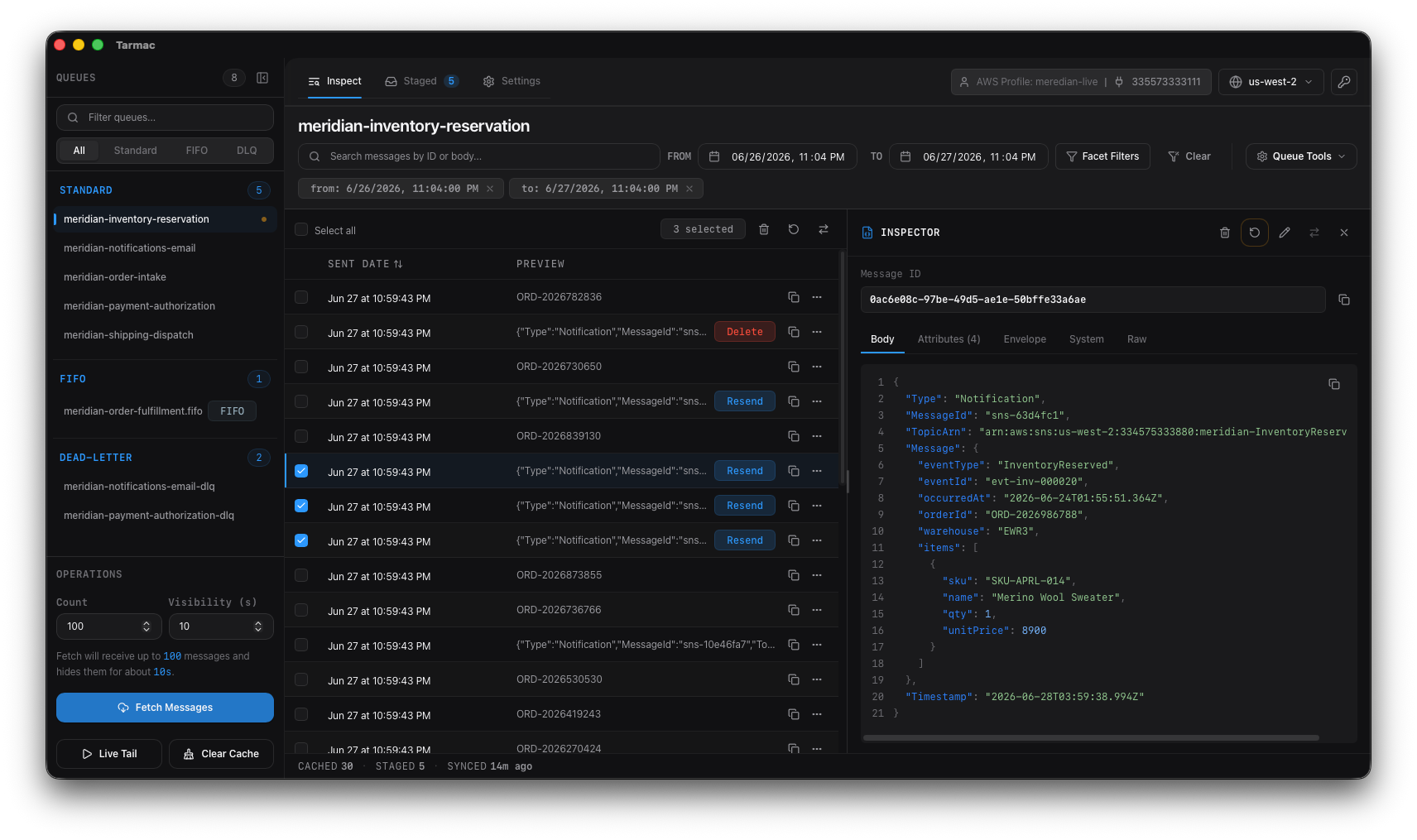
Tarmac is a desktop client for streamlining AWS SQS workflows. It receives each message once into a local cache, then provides full text and faceted search. Stage message actions as you go and publish them back to SQS queues when you're ready.
The problem
SQS has no peek API.
The only way to read a message is to receive it, which puts it in flight for the visibility timeout and increments its receive count. Looking is not free, and the console doesn't do much past polling.
That leaves you in a few familiar spots:
No search over a queue.
The console gives you no full-text search over a body, no filter over attributes, and no cross-message view.
No way to keep what you saw.
A receive hides the message behind the visibility timeout and gives you nothing to hold onto afterward the timeout. You re-poll and wait for the timeout to lapse before that message is even receivable again.
Every mutating action runs immediately.
In the console, delete, requeue, and resend act on the live queue as soon as you confirm them, one message at a time. There's no batch to review first. Operating on a production DLQ, every action is a one-off live mutation.
The solution
Receive once. Read forever. Publish changes when you're ready.
If you've ever tried to work on just a specific subset of DLQ messages, you'll know that it's next to impossible using the AWS Console. With Tarmac, you can fetch 100k messages, search them all in an instant, then stage and changes for delete, re-drive, re-send, or edit and re-send however you see fit.
Search the cache, not the live queue.
Full-text search over evey SQS message, a From/To datetime range, and faceted filters over attributes and JSON body fields — all run in Tarmac's local backend against messages already in the cache. SQS itself has no search.
Inspect Messages
The inspector pretty-prints JSON with line numbers and splits the rest into tabs: parsed body, custom attributes, SQS system metadata, raw. Tarmac will auto-fetch messages
Stage every change before it runs.
Delete, requeue, send, edit-and-resend, and per-message DLQ redrive all stage first, per message or in bulk. Review the batch in a Staged tab, then publish — with a success / skipped / failed breakdown and a reason per message. There is no one-click immediate mutation anywhere in the UI; staging is the safety model.
DLQ redrive without copying ARNs.
Send a dead-letter message's body and attributes back to its source queue and delete the original; FIFO group and dedup IDs carry across. The source queue resolves automatically through ListDeadLetterSourceQueues, so you don't hand-copy ARNs.
Works offline against the cache.
Every message Tarmac receives lands directly onto your machine — full bodies, attributes, timestamps — indexed for search and faceting in the same write. The cache never expires on its own, and shows when each message was cached so you can judge staleness.
Why this beats the bare console or a script.
The AWS web console re-receives on every click and acts immediately. A script gets you receive and delete in a loop — what it doesn't get you for free is a persistent searchable cache, faceted filters, the JSON inspector, SNS unwrap, S3 payload resolution, and a staged batch workflow. Tarmac is that tooling, already built and ready to work.
How it works
Four steps from credentials to publish.
Connect with the AWS setup you already have.
Point Tarmac at an AWS profile set up in your ~/.aws/credentials.
List queues and pull messages into the cache.
Tarmac lists your queues grouped into Standard, FIFO, and Dead-letter; select a queue to fetch messages with a timeout. Pulled messages go in flight for that timeout — not deleted.
Search, filter, and inspect from the cache.
Run full-text search, the datetime range, and facet filters against what's already cached — no new SQS calls. Open any message and read the parsed body, attributes, system metadata, and raw JSON.
Stage, review, publish.
Stage your deletes, requeues, edits, and redrives into the Staged tab, review the whole batch, then publish it as one deliberate step and read the per-message result.
Pricing
One-time purchase. Verified offline.
Not a subscription. Each license includes 12 months of updates; the app keeps working on the version it covers after that — you just stop getting new versions.
Personal
One machine. Full read and write access. 12 months of updates.
Standard
Most popularDeactivate a device anytime to move the license. Full read and write access. 12 months of updates.
Team
Self-serve by seat. Same offline-verified license, scaled to your team.
Every plan starts with the same trial.
The full app for 14 usage-days, with the same read and write access a license gives you. No card. A usage-day is any date you actually run the app, so idle days don't count. On the 15th usage-day it goes read-only — you can still browse and search your whole local cache, you just can't act on queues until you buy.
You May Have Questions
Searching, filtering, and re-inspecting do not — they run against the local SQLite cache and issue no new SQS calls. The one operation that touches the live queue is the initial fetch: SQS has no peek API, so receiving a message into the cache is a real ReceiveMessage. That puts it in flight for the visibility timeout you set (hidden from other consumers) and increments its receive count, exactly like any SQS consumer. Nothing is deleted by a fetch, and a receive-only pull does not empty the queue. After a message is in the cache, you read and re-read it without receiving it again.
It's time to treat yourself and simplify your work.
The trial is the whole app — full read and write access, 14 usage-days, no credit card. A usage-day only counts on a date you actually open Tarmac, so the clock waits for you.
If the trial lapses before you buy, Tarmac falls back to read-only and you keep browsing and inspecting your SQS queues.